


Stay Connected in China
Foreign SIM cards often lose signal in China, requiring you to rely on local Wi-Fi or data. To seamlessly access Google, WhatsApp, Gmail, Instagram, and Facebook and stay connected with friends and family at all times, purchasing this eSIM is essential.
Instant Connectivity
Set up before you fly. Get online the second you land in China for maps, translation, and business emails.
No Airport Lines
Skip the long queues at the arrival hall. No physical SIM cards, no language barriers, just a simple QR code.
Keep Your Home Number
Stay fully connected to China while keeping your primary number active for urgent message.
Seamless Coverage
Reliable high-speed data across all major Chinese cities, ensuring smooth navigation and video calls.
Welcome to China! You can easily scan the code and add the eSIM to your phone before your trip. Don't worry about burning through your data early—the plan will only activate when you land and connect to a local Chinese network.
Once in China, your primary home number will remain completely untouched. This allows you to safely receive urgent calls and bank verification codes, while the eSIM handles all your local internet needs.
With a stable connection, you can instantly access essential local apps. Whether you are hailing a ride, translating menus, or processing payments via Alipay and WeChat, your journey will be smooth and stress-free.
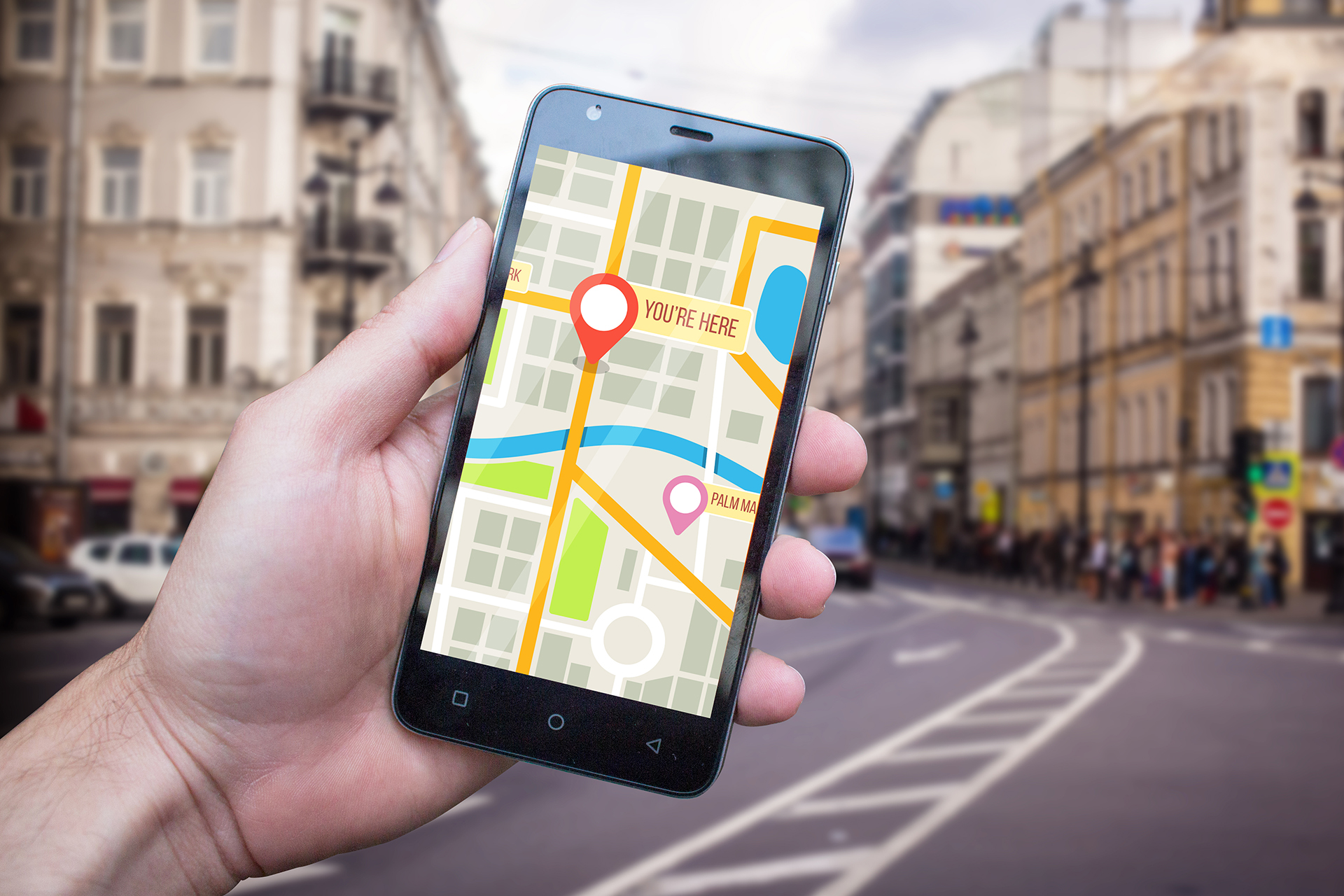
Daily high-speed data, unlimited at reduced speeds thereafter.
| Total Days | High-speed data (GB/Day) | Total Price | Usage Scope |
3 days |
1GB 2GB |
$4 $6 |
Mainland China, Hong Kong |
7 days |
1GB 2GB |
$13 $19 |
Mainland China, Hong Kong and Macao |
10 days |
1GB 2GB |
$18 $27 |
Mainland China, Hong Kong andMacao |
15 days |
1GB 2GB |
$27 $41 |
Mainland China, Hong Kong and Macao |
30 days |
1GB 2GB |
$42 $69 |
Mainland China, Hong Kong , Macao , and Taiwan (China), Pakistan, Philippines, South Korea, Cambodia, Malaysia, Laos, Japan, Sri Lanka, Thailand, Singapore, Indonesia, Vietnam, |
Selected eSIM Plan
Daily High-Speed Data
Voice calls (or Voice & SMS services)
Data rollover
Out-of-plan usage
Chinese Phone Number
What is an eSIM?
The eSIM is a digital SIM card embedded right inside your phone. There is no need to fiddle with tiny physical cards. You can simply set up and activate your mobile plan via software. It also makes switching carriers or adding extra data plans to your device easier than ever.
Instead of waiting in long lines at the airport or struggling with language barriers at a local store, you can set up your China internet plan online before your trip.
Just scan a QR code, and you'll stay seamlessly connected for navigation, translation, and business emails from the second you arrive.
Your device's eSIM support depends on its manufacturer. Use these quick steps to confirm:
- 1. Verify EID Presence
Dial #06# on your phone. If an EID number is displayed, your device supports eSIM. If nothing appears, it does not.
-
2. Confirm Your Device is Unlocked
You must have an unlocked phone to use our eSIM.
iOS: Go to Settings > General > About. Under Carrier Lock, it should say "No SIM restrictions".
Android: Go to Settings > Connections > Mobile Networks > SIM Card Manager. Tap Select Network and enable Select Automatically. If multiple networks appear, your phone is unlocked.
A. Before installing eSIM, please ensure:
Please check and confirm that your device is compatible with eSIM and the network is unlocked (please refer to a List of eSIM-enabled devices)
Ensure you have a stable internet connection, preferably Wi-Fi. (You need to download the eSIM to the device correctly, so a stable internet connection is essential.)
B. Installation steps:
1. Log in to your CMLink eSIM account
2. Go to“My eSIMs”
3. Select the eSIM you want to install, tap“Details”
4. Tap“Install eSIM”
5. You can alos install your eSIM in the following ways
1)Tap "Direct Installation"
2)Scan QR Code
3)Manually fill in installation information
4)Directly tap installation hyperlink (Only supported on iOS 17.4 and above)
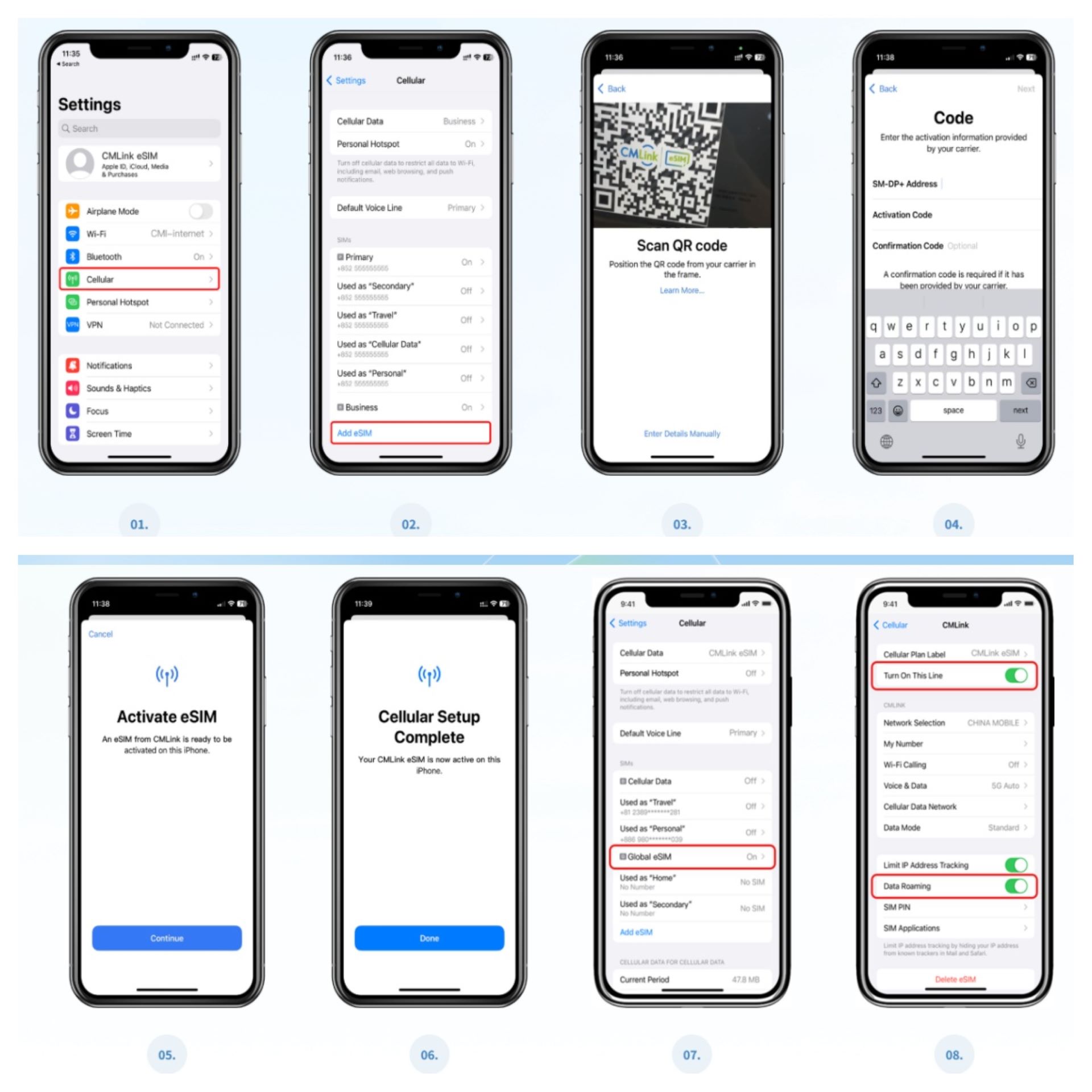
C.Iphone Example-Scan QR Code:
a.Go to Settings and tap Cellular (or Mobile Data).
b.Tap Add eSIM or Set Up Cellular.
c.Select Use QR Code.
d.Scan the provided QR code, then tap Continue twice. Please wait a few moments while your eSIM connects to the network. Once connected, tap Done.
e.Tap Continue to activate your eSIM.
f.Installation successful!
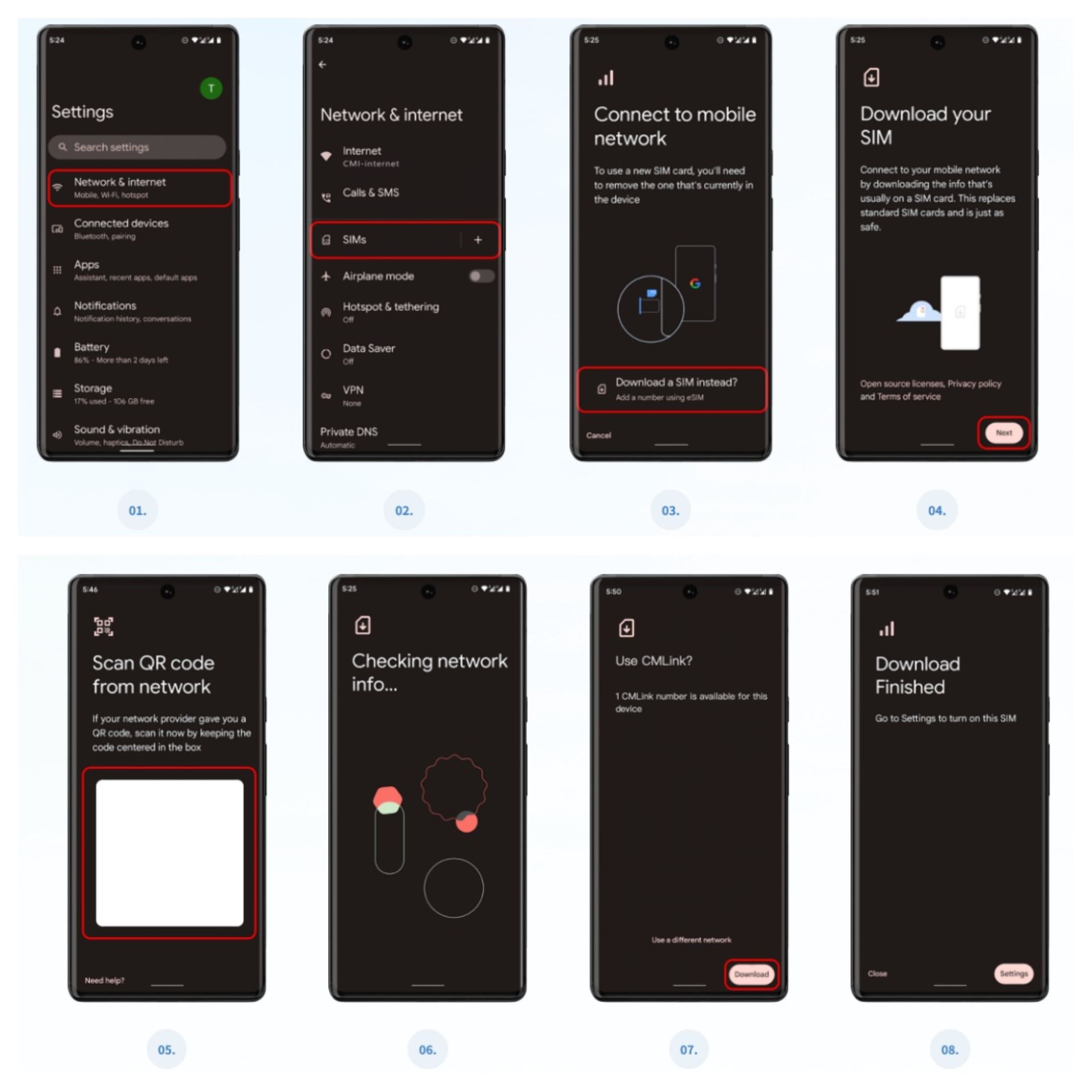
D. Android(Samsung Galaxy as an example )-Scan QR Code:
a.Select the QR code option at the top
b.Go to 'Settings> Connections'.
c.Tap 'SIM Card Manager'.
d.Select 'Add Mobile Package'.
e.Select 'Scan operator QR code'.
f.Scan the QR code by placing it inside the guide line and enter the confirmation code when prompted.
g.Tap 'Add' when the eSIM Option is detected.
h.Once you have registered your plan, select OK to switch it on. activated eSIM, you can view the following in the SIM card manager
To make your trip seamless, we recommend downloading these apps before you arrive:
WeChat: For messaging, payments, and navigating daily life.
Alipay: Another essential app for mobile payments and booking services.
DiDi: The easiest way to hail a ride, similar to Uber.
Gaode Maps / Apple Maps: For reliable navigation and public transit routes.
Translation Apps: To easily communicate with locals.

a.Some specific countries/regions require users to complete an identity verification process (i.e., the real-name authentication process) before activating and using a mobile plan. If identity verification is not completed, the plan cannot be activated or used normally.
b.Please note that an eSIM can typically only be installed once. Therefore, we strongly recommend that you do not remove any eSIMs you still intend to use!Additionally, an eSIM cannot be removed from one device and then installed on a second mobile device.
c.Please note that this eSIM is a pure data solution and does not provide a Chinese phone number. For voice calls and messaging, you will rely on internet-based apps like WeChat, which is exactly how most locals communicate today.
d.Generally, an iPhone can store 5 to 10 eSIMs, while Samsung Galaxy, Google Pixel, Huawei, Xiaomi, and other Android devices allow the installation of 5 to 7 eSIMs. The actual number of eSIMs you can install may vary depending on the specific device model. It is recommended to check with your mobile device manufacturer for confirmation.
e.Your eSIM data is strictly valid during the active period of your plan. After the expiration date, any unused data will automatically expire. We recommend choosing a plan that best fits your travel duration to make the most of your data.